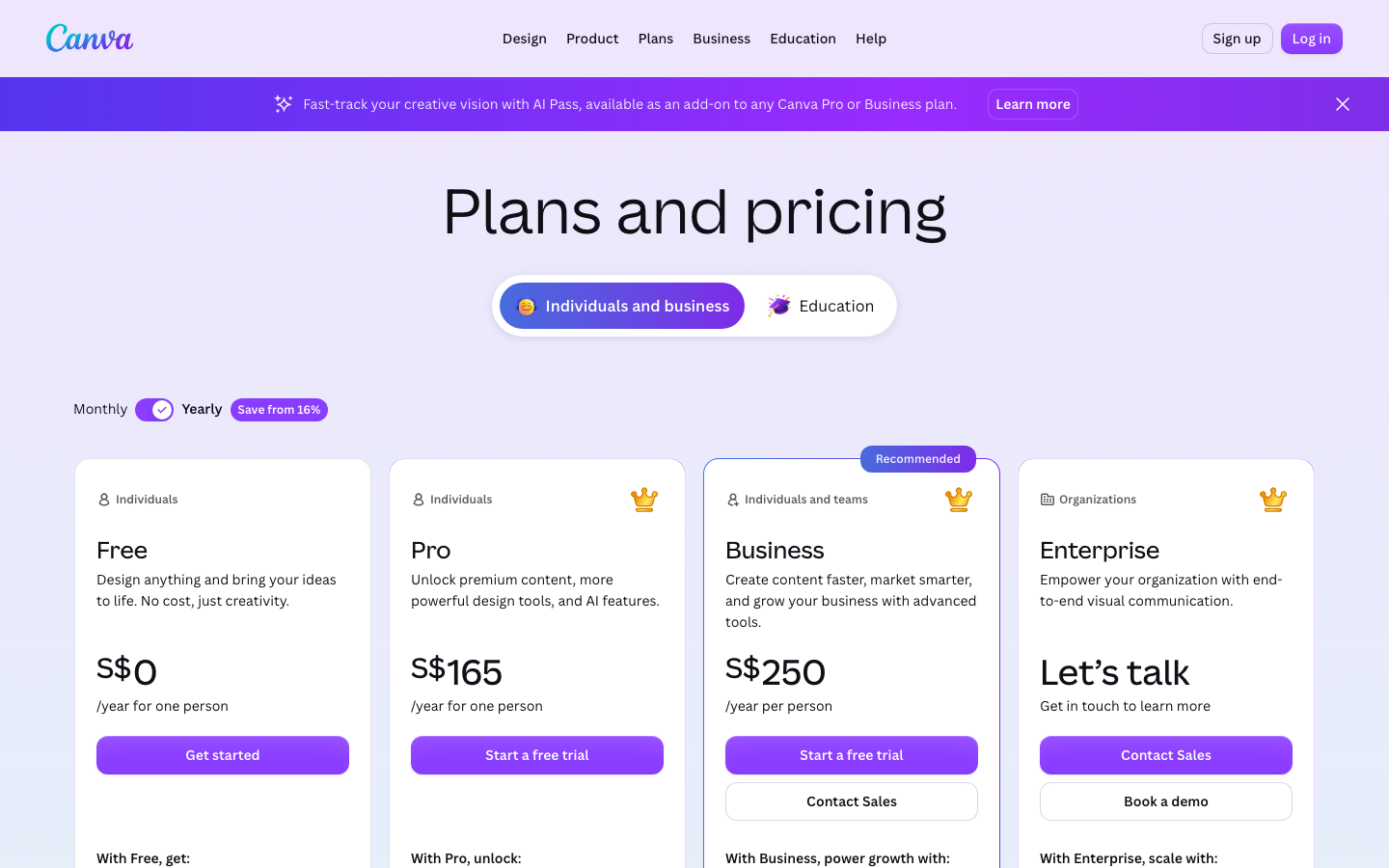
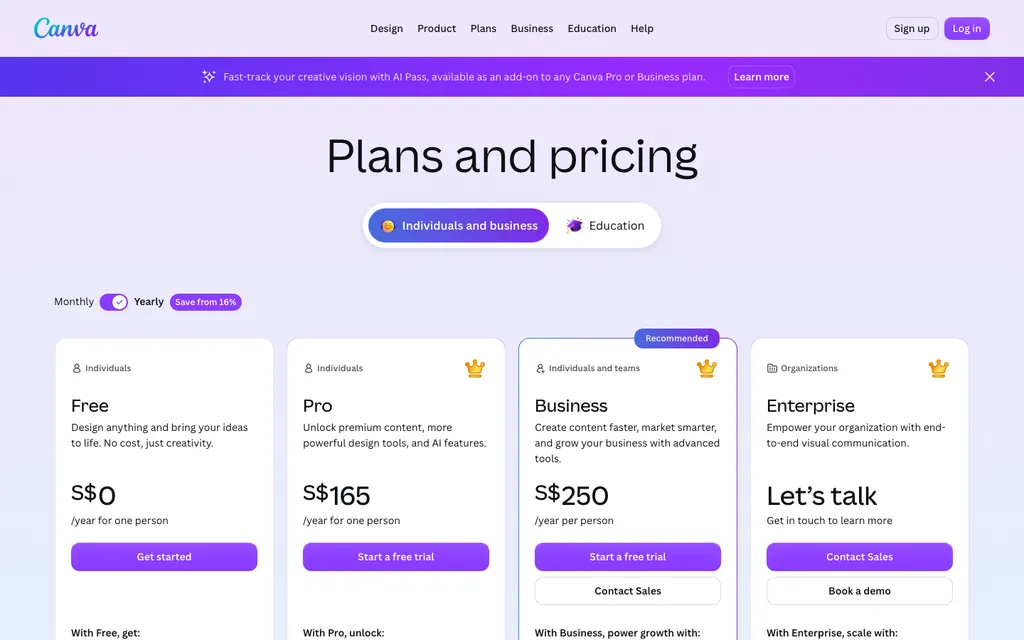
Canva Pro costs more than the free plan and less than a design agency. The exact figure depends on whether you pay month to month or annually, and on the region where you buy. Canva sets regional rates and does not publish a single global sticker price; the US annual subscription often lands in the $110 to $130 band, working out to roughly $10 a month, while the pay-by-the-month option runs closer to $13. Canva Teams, the multi-seat version, carries a per-person charge and requires at least two people. Canva Enterprise rates are available only by contacting sales. Check canva.com/pricing for the current numbers in your currency.
The real question is not the dollar figure. It is whether the extra capabilities justify the upgrade for someone who is not a full-time designer. For many users, the free plan is enough. For anyone who needs to remove backgrounds, resize designs repeatedly, or enforce brand colors across a team, Pro pays for itself in time saved. The 30-day free trial is the honest test: if you do not miss Pro when the trial ends, you do not need it.
What Canva Pro adds that the free plan does not
A broader stock catalog
Canva Free includes more than 250,000 templates, over 1 million free photos and graphics, 5 GB of cloud storage, and limited access to AI design tools. For a small business owner making social posts, a student building a presentation, or a volunteer designing a flyer, that is often sufficient.
Canva Pro unlocks four categories of capabilities that matter differently to different users. The first is the asset collection: over 100 million premium stock photos, videos, audio tracks, and graphics. The free collection is large but limited to older or less polished material. Pro users get the full catalog without paying extra per download.
Time-saving tools
The second category is time-saving tools. Background Remover strips the background from any image in one click. Magic Resize lets you take one design and instantly generate versions for Instagram, LinkedIn, a banner ad, and a flyer. For anyone who posts to multiple platforms, that tool alone can cut an hour of work per week.
Brand consistency
The third category is brand consistency. Brand Kit stores your brand colors, logos, and fonts so every team member produces on-brand output without manual checking. You can also upload custom fonts, which the free plan does not allow.
Uncapped AI tools
The fourth category is AI tools under the Magic Studio label: Magic Eraser, Magic Edit, and others. The free plan offers some AI tools but with usage caps. Pro removes those caps.
Who should pay and who should stay free
When the free plan is enough
The free plan works well for individuals who make a few designs per month, do not need stock photos beyond the free collection, and can live without background removal. That describes most casual users, most students, and many solopreneurs who outsource design anyway.
Social media managers
Canva Pro makes sense for three groups. Social media managers who post daily across multiple platforms will use Magic Resize and the scheduling tool (which supports 8 platforms) every day. The scheduling feature alone replaces a separate social media management tool for some users.
Small teams and freelancers
Small marketing teams and freelancers who produce client-facing materials benefit from Brand Kit and the premium asset collection. Paying for Pro is cheaper than buying stock photos individually through Shutterstock or Getty Images, especially if you need more than a few per month.
Nonprofits and educators
Nonprofit organizations and K-12 educators should check whether they qualify for Canva for Nonprofits or Canva for Education. Both are free plans that include many Pro-level capabilities. A verified nonprofit may get background removal, Brand Kit, and premium assets without paying anything. Educators and their students get similar access.
How Canva Pro compares to other design tools
Adobe Express, Microsoft Designer, and VistaCreate all compete for the same user. Adobe Express has a free tier and a paid Premium plan. It integrates with Creative Cloud for users who already work in Photoshop or Illustrator. Microsoft Designer is bundled with Microsoft 365 subscriptions for some business customers, which can make it effectively free for organizations already on that stack. VistaCreate (formerly Crello) offers a similar tool set at a similar price point.
Canva Pro's advantage is breadth. It has more templates, a larger stock collection, and a smoother workflow for non-designers than any single competitor. Its disadvantage is lock-in. Designs created in Canva are not easily exported into Adobe format. A team that outgrows Canva's capabilities will face a painful migration to professional tools.
For an individual or small team that does not expect to outgrow the platform, Canva Pro is the best value in its category. For an organization that already pays for Creative Cloud or Microsoft 365, the marginal benefit of adding Canva Pro may be small enough that the free plan is the right choice.
What the pricing page does not tell you
The no-card trial
Canva Pro's pricing page shows the month-to-month and annual rates clearly, but it omits a few things worth knowing. First, the 30-day free trial does not require a credit card. You can test every Pro capability and cancel before you are charged. That trial is the best way to answer the worth-it question for your specific workflow.
Promotions and discounts
Second, Canva frequently runs promotions. A new user may see a discounted first-year price, or a limited-time offer for the annual plan. These offers are not always advertised on the main pricing page. If you are not in a hurry, it can pay to wait for a sale or to check deal sites.
Teams pricing at scale
Third, the Teams plan is priced per person, but the per-person cost drops as the team grows. For two or three people, Teams may cost more per person than Pro. For ten or more, the per-person price is lower. The threshold where Teams becomes cheaper than buying individual Pro licenses is not published, but it is worth calculating before you commit.
AI usage caps
Finally, the free plan's AI usage limits are not spelled out on the pricing page. If you rely heavily on Magic Eraser or Magic Edit, you may hit the cap faster than expected. The free trial will reveal whether that matters for your use case.
Canva pricing at a glance
- Canva Free: $0 per month. Includes 250,000+ templates, 1 million+ free photos and graphics, 5 GB storage, limited AI tools.
- Canva Pro (monthly): Varies by region. Canva sets the rate; in the US it is typically around $13 per month. Includes all Free features plus 100 million+ premium assets, Background Remover, Magic Resize, Brand Kit, 1 TB storage, unlimited AI tools. Check canva.com/pricing for your local price.
- Canva Pro (annual): Varies by region. Canva sets the rate; in the US it is typically around $120 per year (about $10 per month). Same features as the month-to-month plan at a discount. Check canva.com/pricing for your local price.
- Canva Teams (per person per month): Varies by region and team size. Canva sets the rate. Requires minimum 2 seats. Includes all Pro features plus team collaboration tools and shared brand assets.
- Canva Enterprise: Rate available upon request from Canva's sales team. For large organizations with advanced admin, security, and integration needs.
- Canva for Nonprofits: Free for verified nonprofit organizations. Includes many Pro-level features.
- Canva for Education: Free for verified K-12 educators and their students. Includes many Pro-level features.
Canva Free vs Canva Pro: key differences
| Feature | Canva Free | Canva Pro |
|---|---|---|
| Templates | 250,000+ | All Free templates plus premium templates |
| Photos and graphics | 1 million+ free assets | 100 million+ premium stock photos, videos, audio, and graphics |
| Cloud storage | 5 GB | 1 TB |
| Background Remover | No | Yes, one-click |
| Magic Resize | No | Yes, resize to multiple formats instantly |
| Brand Kit | No | Yes, set brand colors, logos, and fonts |
| Custom fonts | No | Yes, upload your own fonts |
| AI design tools | Limited usage | Unlimited usage |
| Social media scheduling | No | Yes, schedule to 8 platforms |
| Free trial | N/A | 30 days, no credit card required |
Frequently asked questions about Canva pricing
Is Canva Pro worth the money for a freelancer?
It depends on how often you use the paid features. A freelancer who makes multiple designs per week and needs stock photos or background removal will save time that more than covers the cost. A freelancer who makes one design per month is better off with the free plan.
Can I try Canva Pro before I pay?
Yes. Canva offers a 30-day free trial of Canva Pro. It does not require a credit card. You can cancel at any time during the trial and you will not be charged.
Does Canva offer discounts for students or nonprofits?
Yes. Canva for Education is free for verified K-12 educators and their students. Canva for Nonprofits is free for verified nonprofit organizations. Both plans include many features that are otherwise only available in Canva Pro.
What is the difference between Canva Pro and Canva Teams?
Canva Pro is for one person. Canva Teams is for multiple users and includes shared brand assets, team templates, and collaboration features like comments and approvals. Teams costs more per person than Pro.
Can I switch from month-to-month to annual billing?
Yes. You can upgrade from month-to-month to annual billing at any time. Canva will apply the annual discount to the remaining months of your subscription.
\nRelated reading: How to add a link in Canva.